Users are getting an error message when running/re-running a filtered report and trying to preview it.
Note: In order to expedite the process of re-running a report, BillQuick remembers the last filters used on a report.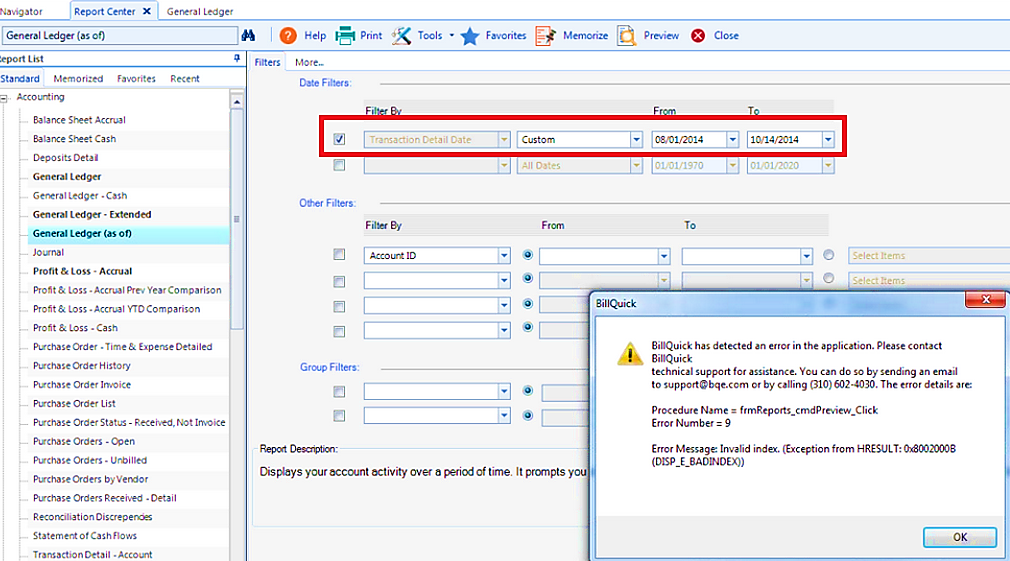

In rare cases, when a particular report is updated (manually or via software update), the filter options for the report are altered. This is because the filter option is no longer applicable for the new report design. BillQuick sees the same (report) file name and auto-loads your last filters. The Filter By selection might be unavailable or isolating a filter that is no longer present.
Follow the steps below to resolve the problem:
- In the Report Center, select the desired report.
- On the Tools menu, select Clear. This erases the last used filters and ensures it is running from scratch.
Note: Also on the Tools menu, the Clear All Filters option erases every used or saved filter; therefore, use caution and be careful which option you select.